How to get started with LangChain without the pain of navigating the docs.
Have you been wanting to work with Large Language Models (LLMs) but find that each LLM API service has different parameters and different JSON returns? Does prototyping become cumbersome because you need to rewrite a lot of code anytime you want to try a different model? Or, do you find that writing your own routing logic for multiple chained prompts becomes too complicated too fast? You need to ensure the correct order of execution, proper batching, and potentially even the headache of asynchronicity. Maybe you’re building a chatbot and find managing all the messages and parameters irritating. The good news is that LangChain solves a lot of these issues!
LangChain is an open-source framework designed to make working with LLMs easier, providing a standard interface across a wide variety of models. It abstracts away the complexities of each model and allows us to do rapid prototyping.
Note: While LangChain excels at interacting with cloud-based LLMs like ChatGPT, Claude, and Gemini, it might not be the best choice for local LLMs. For local environments, consider services like Ollama or LM Studio, which offer finer control over these models. Specifically in the case of LM Studio, you can expose an API endpoint on your machine and then modify the base url parameter in the OpenAI API and you can re-use the same code that you use when dealing with an OpenAI API. You can learn more about Ollama here and LM Studio here.
In this article, I’ll break down the fundamental components of LangChain, demonstrate how to combine them for basic chains, explore the combination of multiple chains, discuss asynchronous execution, and present a project that applies all these principles.
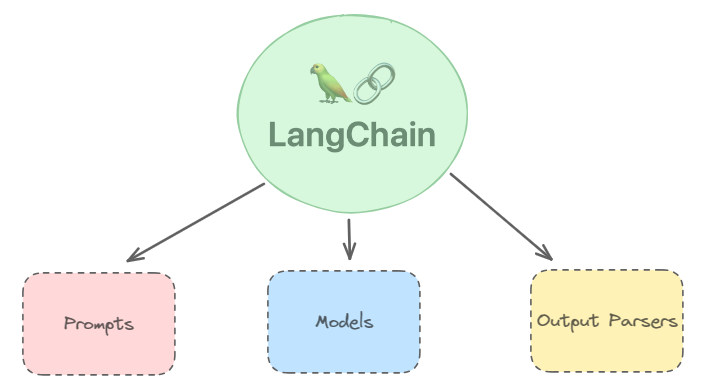
Basic parts of Chain:
LangChain ‘chains’ are the core of its functionality. A chain handles the execution of a single prompt. While chains might seem like overkill for a simple one-prompt task, the real power comes from linking multiple prompts together. With a single command, you can effortlessly execute a sequence of prompts and store their results.
Important Note: If you’re referencing the LangChain docs, be aware that some parts of the docs may use the older, deprecated chain system. Things like SequentialChain are no longer necessary. Instead, focus on using the LangChain Expression Language (LCEL). LCEL is designed to make building and understanding pipelines even easier.
This is pretty self-explanatory. Prompts are the instructions you give the Large Language Model (LLM). LangChain uses ‘Templates’ to make prompts more flexible.
from langchain.prompts import PromptTemplate

content_template="""# CONTEXT #
I want to advertise for my company's duty free product catalogue. The SKU Name of the product is {sku_name}, brand of the product is {brand_name} and its category is : {sub_category}.

# OBJECTIVE #
Create new product description for the above product based on the following existing description: {description}. Extract all key points and features from the existing description and write a new description from them. The word count should be similar to the original description.

# STYLE #
The writing style needs focus on the unique aspects of the product - its ingredients, its process, its history. Use descriptive language to evoke sensory experience - taste, smell, touch. Be precise and concise when writing. The content needs to be simple enough for the common man to understand it.
Following words are BLACKLISTED from appearing in the response: 'transformative','tapestry','like',';','-'.
REPLACE the following words with a more descriptive and specific response: 'foster','fostering','all about','is about','think of','like','but also'.

# TONE #
Simple, clear and elegant.

# AUDIENCE #
My company's audience profile is the common man who likes to indulge in the finer things in life every once in a while.
"""

content_prompt=PromptTemplate(input_variables=["sku_name","brand_name","sub_category","description"],template=content_template)
Above is an example of a prompt that I used in a recent project. You basically create a python string with the prompt you want the LLM to process, and wherever you want to dynamically insert a variable like different product names, product categories, product subcategories and so on, you can use the {} notation similar to a python f-string. Then all you need to do is initialize the PromptTemplate class with all the variables that you declared.
If you are wondering why I have formatted the prompt in a bizarre way, it is a prompt engineering framework called CO-STAR which was designed by the GovTech Singapore’s AI and Data Science team which allows us to guide an LLM model easily by just following a few guidelines. More information about CO-STAR here.
Note: If you are dealing with Chatbots, you can use a special template called ChatPromptTemplate which will help you deal with features specific to Chat models. This guide won’t be dealing with Chatbot specific code but I will provide references where you can find out more about making a Chatbot through LangChain here.
2. Models
LangChain uses various model classes to interface with various types of LLMs. Some notable model classes are Anthropic , AzureOpenAI , OpenAI etc. You can find all the supported models here.
llm=ChatOpenAI(
openai_api_key="replace-this-with-your-api-key",
model="gpt-4-1106-preview",
model_kwargs={
    "response_format": {
      "type": "json_object"
    },
    "presence_penalty":1.0
  },
temperature=1
)
You can see above how you can declare a model object for OpenAI models using ChatOpenAI . Some things to note:
3. Output Parsers
The final component of a LangChain chain is an output parser. When integrating LLM data into a production pipeline, you need a consistent way to retrieve the output. This output might be in JSON, XML, or other formats. The goal is to extract the relevant information reliably. However, this can be challenging because LLMs sometimes include extraneous text along with a valid JSON structure.
Example:
Consider this LLM response:
Sure! The output in JSON format is below:
{
  "product_info":"insert product info"
}
The response mixes introductory text with the JSON data. You can’t parse this directly; you need to find and extract the JSON portion first. Fortunately, LangChain offers several output parsers designed to handle these situations. One of the most useful and flexible parsers is the Pydantic parser. It allows us to define our own object schema, ensuring our LLM output is structured as expected. Let’s see how a Pydantic parser works, continuing with the prompt we started earlier:
from langchain.output_parsers import PydanticOutputParser
from langchain.prompts import PromptTemplate
from langchain_core.pydantic_v1 import BaseModel, Field, validator

class Product(BaseModel):
    product_description : str = Field(description="The generated product description")

parser= PydanticOutputParser(pydantic_object=Product)

content_template="""# CONTEXT #
I want to advertise for my company's duty free product catalogue. The SKU Name of the product is {sku_name}, brand of the product is {brand_name} and its category is : {sub_category}.

# OBJECTIVE #
Create new product description for the above product based on the following existing description: {description}. Extract all key points and features from the existing description and write a new description from them. The word count should be similar to the original description.

# STYLE #
The writing style needs focus on the unique aspects of the product - its ingredients, its process, its history. Use descriptive language to evoke sensory experience - taste, smell, touch. Be precise and concise when writing. The content needs to be simple enough for the common man to understand it.
Following words are BLACKLISTED from appearing in the response: 'transformative','tapestry','like',';','-'.
REPLACE the following words with a more descriptive and specific response: 'foster','fostering','all about','is about','think of','like','but also'.

# TONE #
Simple, clear and elegant.

# AUDIENCE #
My company's audience profile is the common man who likes to indulge in the finer things in life every once in a while.

# RESPONSE #
{format_instructions}
"""

content_prompt=PromptTemplate(input_variables=["sku_name","brand_name","sub_category","description"],template=content_template,partial_variables={"format_instructions":parser.get_format_instructions()})
Explanation
If you were curious as to what the get_format_instructions() looks like, here you go.
The output should be formatted as a JSON instance that conforms to the JSON schema below.

As an example, for the schema {"properties": {"foo": {"title": "Foo", "description": "a list of strings", "type": "array", "items": {"type": "string"}}}, "required": ["foo"]}
the object {"foo": ["bar", "baz"]} is a well-formatted instance of the schema. The object {"properties": {"foo": ["bar", "baz"]}} is not well-formatted.

Here is the output schema:
```
{"properties": {"product_description": {"title": "Product Description", "description": "The generated product description", "type": "string"}}, "required": ["product_description"]}
```
We can see how LangChain has abstracted the tedious part of prompt engineering and made it easier to get consistent outputs.
Getting consistent output is one of the many uses of parsers, another major use case is to automatically fix any errors encountered by the model. For example, LLMs aren’t perfect and make mistakes like not generating a valid JSON schema. We don’t want the process to break during the pipeline so we can mitigate this issue by using the OutputFixingParser which takes an existing parser as input along with an LLM to fix any potential mistakes that we might encounter. All you need to change in the existing code is the following:
from langchain.output_parsers import OutputFixingParser
from langchain.output_parsers import PydanticOutputParser
from langchain.prompts import PromptTemplate
from langchain_core.pydantic_v1 import BaseModel, Field, validator

class Product(BaseModel):
    product_description : str = Field(description="The generated product description")

parser= PydanticOutputParser(pydantic_object=Product)

output_fixing_parser=OutputFixingParser(parser=parser,llm=llm)

content_template="""# CONTEXT #
I want to advertise for my company's duty free product catalogue. The SKU Name of the product is {sku_name}, brand of the product is {brand_name} and its category is : {sub_category}.

# OBJECTIVE #
Create new product description for the above product based on the following existing description: {description}. Extract all key points and features from the existing description and write a new description from them. The word count should be similar to the original description.

# STYLE #
The writing style needs focus on the unique aspects of the product - its ingredients, its process, its history. Use descriptive language to evoke sensory experience - taste, smell, touch. Be precise and concise when writing. The content needs to be simple enough for the common man to understand it.
Following words are BLACKLISTED from appearing in the response: 'transformative','tapestry','like',';','-'.
REPLACE the following words with a more descriptive and specific response: 'foster','fostering','all about','is about','think of','like','but also'.

# TONE #
Simple, clear and elegant.

# AUDIENCE #
My company's audience profile is the common man who likes to indulge in the finer things in life every once in a while.

# RESPONSE #
{format_instructions}
"""

content_prompt=PromptTemplate(input_variables=["sku_name","brand_name","sub_category","description"],template=content_template,partial_variables={"format_instructions":parser.get_format_instructions()})
All we needed to do is to wrap our existing parser with the new OutputFixingParser which will ensure that we don’t get any unexpected issues when running the pipeline.
Putting it together:
Now that we have seen how individual components work, let’s put them all together and create our first program! The entire code is now below:
from langchain.chat_models import ChatOpenAI
from langchain.prompts import PromptTemplate
from langchain.output_parsers import PydanticOutputParser
from langchain_core.pydantic_v1 import BaseModel, Field
from langchain.output_parsers import OutputFixingParser

llm=ChatOpenAI(
    openai_api_key="insert-your-api-key-here",
    model="gpt-4-1106-preview",
    model_kwargs={
    "presence_penalty":1.0
    },
    temperature=1
    )

class Product(BaseModel):
    product_description : str = Field(description="The generated product description")

content_template="""# CONTEXT #
I want to advertise for my company's duty free product catalogue. The SKU Name of the product is {sku_name}, brand of the product is {brand_name} and its category is : {sub_category}.

# OBJECTIVE #
Create new product description for the above product based on the following existing description: {description}. Extract all key points and features from the existing description and write a new description from them. The word count should be similar to the original description.

# STYLE #
The writing style needs focus on the unique aspects of the product - its ingredients, its process, its history. Use descriptive language to evoke sensory experience - taste, smell, touch. Be precise and concise when writing. The content needs to be simple enough for the common man to understand it.
Following words are BLACKLISTED from appearing in the response: 'transformative','tapestry','like',';','-'.
REPLACE the following words with a more descriptive and specific response: 'foster','fostering','all about','is about','think of','like','but also'.

# TONE #
Simple, clear and elegant.

# AUDIENCE #
My company's audience profile is the common man who likes to indulge in the finer things in life every once in a while.

{format_instructions}
"""

parser= PydanticOutputParser(pydantic_object=Product)
output_fixing_parser=OutputFixingParser(parser=parser,llm=llm)
content_prompt=PromptTemplate(input_variables=["sku_name","brand_name","sub_category","description"],template=content_template,partial_variables={"format_instructions":parser.get_format_instructions()})
content_runnable = content_prompt | llm  | output_fixing_parser
Viola! Our prompt is ready to be run. You might have noticed something I haven’t mentioned before, what's a ‘runnable’ and what are those ‘|’ operators doing?
A runnable can basically be considered as a series of operations that need to be performed in a row. You can also call it a “chain”.
We are basically feeding the content_prompt template into the GPT-4 Turbo API which is then fed into the output_fixing_parser which finally gives us a structured response containing the information we need. If you have ever used Bash or other Linux based terminals you should be familiar with the ‘|’ (pipe) operator and how it is used to feed output of one command into another command. This is the power of the LangChain Expression Language, it is very easy to visualize all of the runnables.
Now let’s try running the runnable with the following sample input.
"brand_name":"Chloe"
"sku_name":"CHLOÉ Atelier des Fleurs Magnolia Alba Eau de Parfum 150ml"
"sub_category":"Perfumes"
"description":"The House of Chloé unveils a collection of nine exclusive Eau de Parfum fragrances for woman: Atelier des Fleurs.\nMagnolia Alba transcribes the smooth, plump and slightly lemony notes of magnolia blossoms in spring."
user_input={
"brand_name":"Chloe",
"sku_name":"CHLOÉ Atelier des Fleurs Magnolia Alba Eau de Parfum 150ml",
"sub_category":"Perfumes",
"description":"The House of Chloé unveils a collection of nine exclusive Eau de Parfum fragrances for woman: Atelier des Fleurs.\nMagnolia Alba transcribes the smooth, plump and slightly lemony notes of magnolia blossoms in spring."
}

result=content_runnable.invoke(user_input)
print(result.product_description) 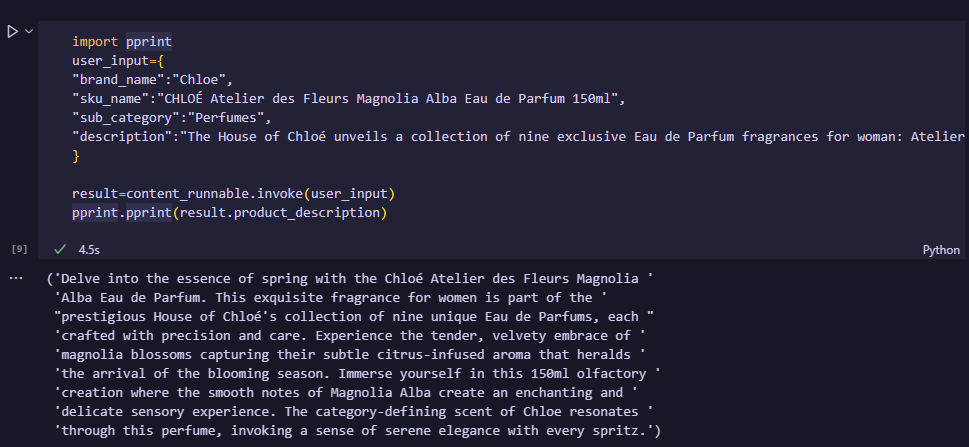
We can execute a runnable by using the .invoke() method. The invoke() method accepts a dictionary consisting of all the input_variables that we declared in the content_prompt variable. Note: We don’t need to provide partial_variables dynamically.
If everything goes right, you should get your result in the proper format which you specified.
Now, you might be wondering, why go through all this effort just to get an output for a single prompt? Well, the magic of LangChain shines when you’ve set up the proper foundation. Let’s say you want to try a different LLM like Gemini-pro. All you need to do is replace:
llm=ChatOpenAI(
    openai_api_key="insert-your-api-key-here",
    model="gpt-4-1106-preview",
    model_kwargs={
    "presence_penalty":1.0
    },
    temperature=1
    )
with
# You might have to install a dependency for this, refer to the ChatGoogleGenerativeAI page on LangChain Docs for more
from langchain_google_genai import ChatGoogleGenerativeAI

if "GOOGLE_API_KEY" not in os.environ:
    os.environ["GOOGLE_API_KEY"] = "insert-your-api-key-here"

llm = ChatGoogleGenerativeAI(model="gemini-pro")
And that’s it! The rest of your code remains unchanged, allowing for super-fast prototyping and easy comparisons between different models.
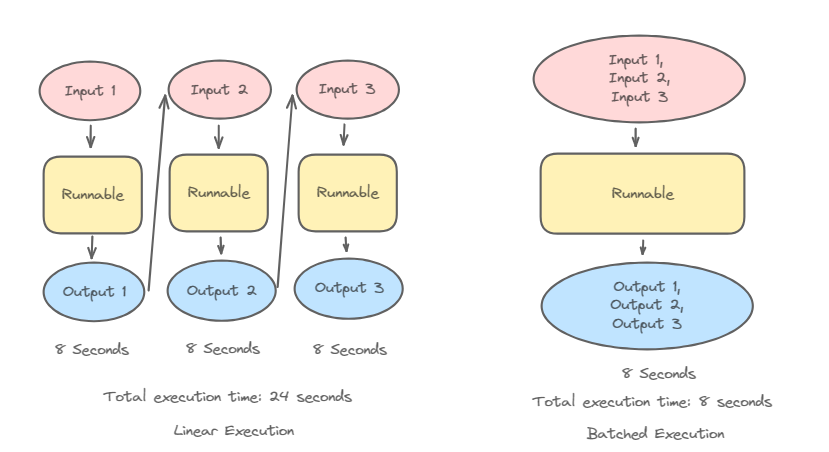
Let’s say you want to run multiple inputs through your runnable. LangChain makes this easy! Every runnable object has attributes like sync(), batch(), async(), abatch(), and more. Refer to the LCEL page if you wish to learn more. Here's how to perform batching in LangChain:
array_of_input=[
    {'brand_name': 'Tiffani & Co.',
    'sku_name': 'TIFFANY & CO. Sheer Eau de Toilette 75ml',
    'sub_category': 'Perfumes',
    'description': 'A bright and sparkling interpretation of the signature fragrance, Tiffany Sheer Eau de Toilette is a vibrant floral scent with notes of ylang ylang, black currant and the noble iris.',
    'rewritten': None},
    {'brand_name': 'Davidoff',
    'sku_name': 'Davidoff Cool Water After Shave Lotion for Him 75ml',
    'sub_category': 'Perfumes',
    'description': "Step up your grooming routine with Davidoff's Cool Water After Shave Lotion. This Lotion nourishes, soothes and calms your skin post-shave, leaving it lightly scented with the marine notes of Cool Water. Cool Water After Shave Lotion, the ultimate touch to complement your Eau de Toilette.",
    'rewritten': None},
    {'brand_name': 'Davidoff',
    'sku_name': "Davidoff Men's 3-Pc. Cool Water Eau de Toilette Festive Gift Set",
    'sub_category': 'Perfumes',
    'description': "This Christmas, celebrate a festive moment with the Cool Water Eau de Toilette Festive Gift Set. Dive deep into the fresh invigorating power of the ocean and pure masculinity of the iconic Cool Water Eau de Toilette fragrance. Bringing together the essentials of a man's routine, Cool Water Man Eau de Toilette, a foaming Shower Gel hair and body wash that cleanses and refreshes while protecting the skin’s natural balance and an After Shave Balm that immediately nourishes, soothes and calms freshly shaven skin. Let the iconic fougere aromatic scent of Cool Water carry you away, feel the strength of deep waters and pure masculinity envelop you. This festive gift set includes Davidoff Cool Water Man Eau de Toilette 125 ml, Shower Gel 75 ml and After Shave Balm 75 ml.",
    'rewritten': None}
    ]

result=content_runnable.batch(array_of_input)
print(result)
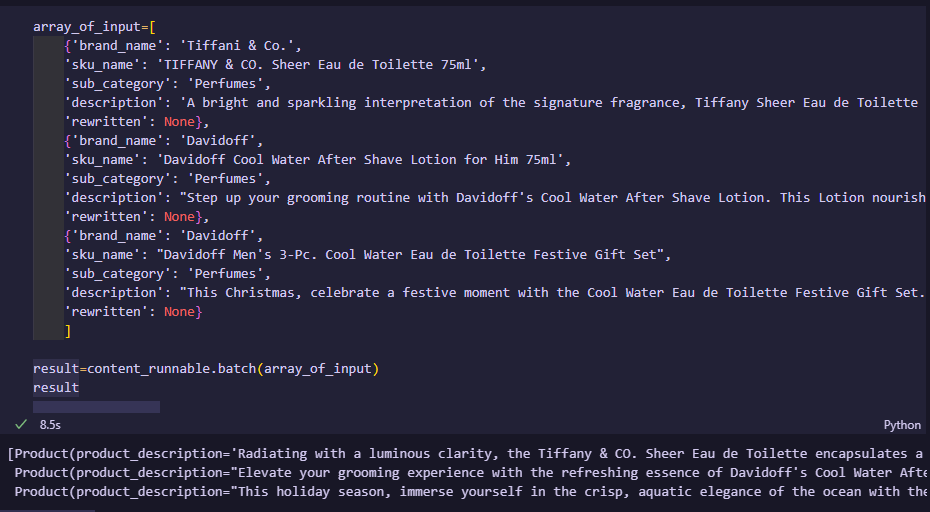
To perform batching, create an array of dictionaries, each containing the necessary input data for your runnable. Then, simply pass this array to the batch() function. LangChain will process all inputs in parallel for maximum efficiency. You will then receive an array of Product objects containing all the information you need.
Routing in LangChain
Let’s do something a bit more complex. We’ll build a system that automatically routes customer support queries to the appropriate agent based on their category (payment, delivery, or product). This will be accomplished using LangChain’s RunnableLambda class.
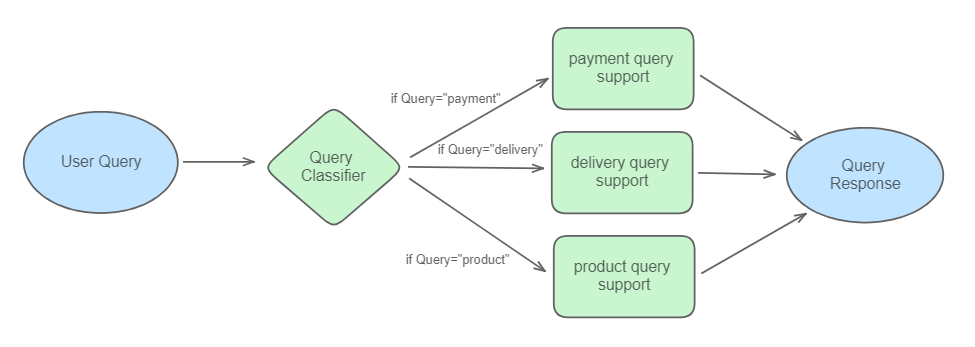
Let’s create a classifier to determine if a query relates to payments, delivery, or product issues.
from langchain.chat_models import ChatOpenAI
from langchain.prompts import PromptTemplate
from langchain.output_parsers import PydanticOutputParser
from langchain_core.pydantic_v1 import BaseModel, Field
from langchain.output_parsers import OutputFixingParser
from langchain_core.runnables import RunnableLambda

llm=ChatOpenAI(openai_api_key="insert-api-key-here",model="gpt-4-1106-preview",model_kwargs={
    "presence_penalty":1.0
  },temperature=1)

class Query(BaseModel):
    query_category : str = Field(description="The query category to be classified")

query_classifier_template="""
Your job is to classify user queries into payment issues, delivery issues and product issues.

Do NOT respond with more than 1 word.

Query: {query}

{format_instructions}"""

query_parser= PydanticOutputParser(pydantic_object=Query)
query_output_fixing_parser=OutputFixingParser(parser=query_parser,llm=llm)

query_classifier_prompt=PromptTemplate(input_variables=["query"],template=query_classifier_template,partial_variables={"format_instructions":query_parser.get_format_instructions()})
query_classifier_runnable = query_classifier_prompt | llm  | query_output_fixing_parser
Now we’ll create separate runnables tailored for responding to each query type.
class Response(BaseModel):
    response : str = Field(description="Response provided as a response to the query")

payment_issues_template="""
You are a PayTM customer service representative. Introduce yourself first. Your job is to address the queries related to payment issues. Help the user out in 2 sentences.

Query is {query}

{format_instructions}"""

delivery_issues_template="""
You are a delhivery customer service representative. Introduce yourself first. Your job is to address the queries related to delivery issues. Help the user out in 2 sentences.

Query is {query}

{format_instructions}"""

product_issues_template="""
You are an Amazon customer service representative. Introduce yourself first. Your job is to address the queries related to product issues. Help the user out in 2 sentences.

Query is {query}

{format_instructions}"""

response_parser=PydanticOutputParser(pydantic_object=Response)
response_output_fixing_parser=OutputFixingParser(parser=response_parser,llm=llm)

payment_issues_prompt=PromptTemplate(input_variables=["query"],template=payment_issues_template,partial_variables={"format_instructions":response_parser.get_format_instructions()})
payment_issues_runnable = payment_issues_prompt | llm  | response_output_fixing_parser

delivery_issues_prompt=PromptTemplate(input_variables=["query"],template=delivery_issues_template,partial_variables={"format_instructions":response_parser.get_format_instructions()})
delivery_issues_runnable = delivery_issues_prompt | llm | response_output_fixing_parser

product_issues_prompt=PromptTemplate(input_variables=["query"],template=product_issues_template,partial_variables={"format_instructions":response_parser.get_format_instructions()})
product_issues_runnable = product_issues_prompt | llm | response_output_fixing_parser
Here’s the core logic to route queries to the correct runnables:
def logic(category):
    if "payment" in category['info'].query_category.lower():
        return payment_issues_runnable
    elif "delivery" in category['info'].query_category.lower():
        return delivery_issues_runnable
    else :
        return product_issues_runnable
category is the variable which will be returned by query_classifier_runnable which follows the Query class. The routing logic is simple, if ‘payment’ is present in the query_classifier_runnable response then we route the query to payment_issues_runnable . If ‘delivery’ is present in the query_classifier_runnable response then we route the query to delivery_issues_runnable else we route the query to product_issues_runnable . We declare that the response from the query_classifier_runnable object is stored in the info attribute of the category variable as declared below.
complete_classification_pipeline = {
    "query": lambda x: x["query"],
    "info": query_classifier_runnable
} | RunnableLambda(logic)
The query variable is what will hold our input that we provide and pass it along to the respective prompts.
Since complete_classification_pipeline is also a Runnable , it also inherits all the methods such as invoke() , batch() , stream() and so on. So to test the logic out, let’s use the invoke() method on some prompts.
result=complete_classification_pipeline.invoke({"query":"Your payment gateway crashed midway through payment and it withdrew money from my bank account without giving me the subscription. What can i do?"})
result.response 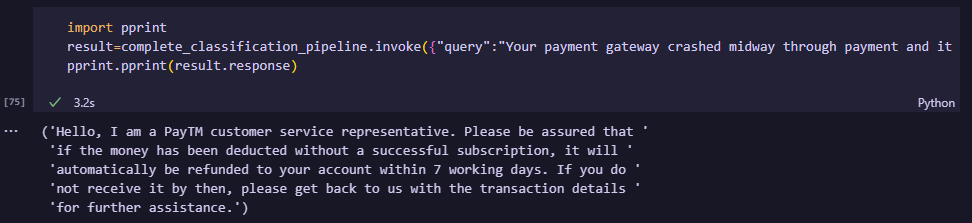
result=complete_classification_pipeline.invoke({"query":"The delivery driver hasn't arrived yet. What do I do?"})
result.response 
result=complete_classification_pipeline.invoke({"query":"The headphones arrived faulty. What should I do?"})
result.response 
As we can see, based on the query each of the queries went into their respective prompts through our defined routing and we successfully got proper feedback.
Summary:
The examples explored in this article represent just a fraction of what LangChain can achieve. From streamlined prototyping to complex multi-step systems, LangChain provides a flexible and robust framework for unlocking the full capabilities of large language models in your applications. There are many more things like Chatbots, RAG systems, Agents and so much more which can be made in LangChain.
While LangChain’s documentation has room for improvement, it remains a valuable resource for your LLM development journey. You’ll also discover helpful insights from external sources, like this Medium article on LCEL. Now that you’ve grasped the basics, it’s time to unleash your creativity and start experimenting!
I try to explore a lot of theoretical concepts in the ML space, with an emphasis on practical and intuitive applications.
Thanks for reading this article! If you have any questions, I will be happy to answer them. Feel free to message me on my LinkedIn or my email for other queries.