
By leveraging the capabilities of OpenAI’s CLIP to analyze both imagery and associated text, we can dramatically enhance search quality, providing a comprehensive, dual-faceted approach.
In the digital age, even a single image can encapsulate vast amounts of information, narratives, and subtle details. But imagine if our machines could decipher images not merely by their visual elements, but also by the text they ‘read’. This principle is at the heart of OpenAI’s CLIP, a tool poised to bridge the gap between Computer Vision and Natural Language Processing. In this article, I’ll guide you step by step, demonstrating how we can harness the full potential of CLIP for advanced image searching.
The GitHub link for this project can be found here.
Problem Statement
Our objective is to illustrate that the integration of textual features, extracted by CLIP, along with image features derived from the same source, can enhance the overall accuracy. This combined approach may yield superior results compared to traditional reverse image search systems that rely solely on image similarity.
Value Proposition of the project
What is Reverse Image Search?
Reverse image search is like asking the search engine, “Where else have you seen this picture?” Instead of typing in words to find images, you use an image to find similar or related images and information about them.
Traditionally, reverse image search works by comparing the uploaded image’s patterns, colors, and certain defining features against a vast database of images. Popular platforms like Google Images and TinEye have made this functionality widely accessible.
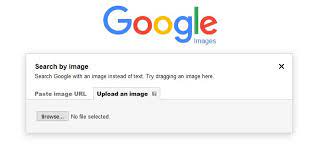
But these conventional methods have their downsides:
Now this is where CLIP steps in.
CLIP, developed by OpenAI, can understand both visual and textual content in images. This means it can find matches based on patterns and context, as well as the text within the image. It addresses the downsides by offering a more holistic image understanding, thereby potentially providing more accurate and relevant search results.
For more in-depth information on CLIP, you can check out my previous article where I delved deeper into CLIP.
Image aesthetics quantification using OpenAI CLIP
Methodology:
For this project, I’ve curated a dataset consisting of 30 liquor images, with their respective names used as the filenames. You’re welcome to modify this to fit your specific requirements. Here’s a glimpse of the dataset:
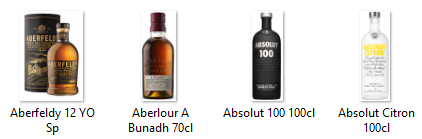
There are two parts to the search: image similarity and text similarity. One might think that a simple image similarity with a good threshold would be suitable for this. However, let me provide you with a case where it doesn’t perform to the best of its capabilities.
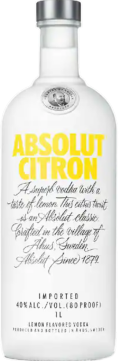
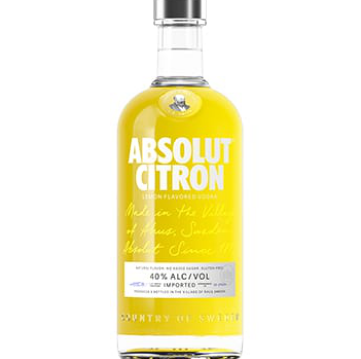
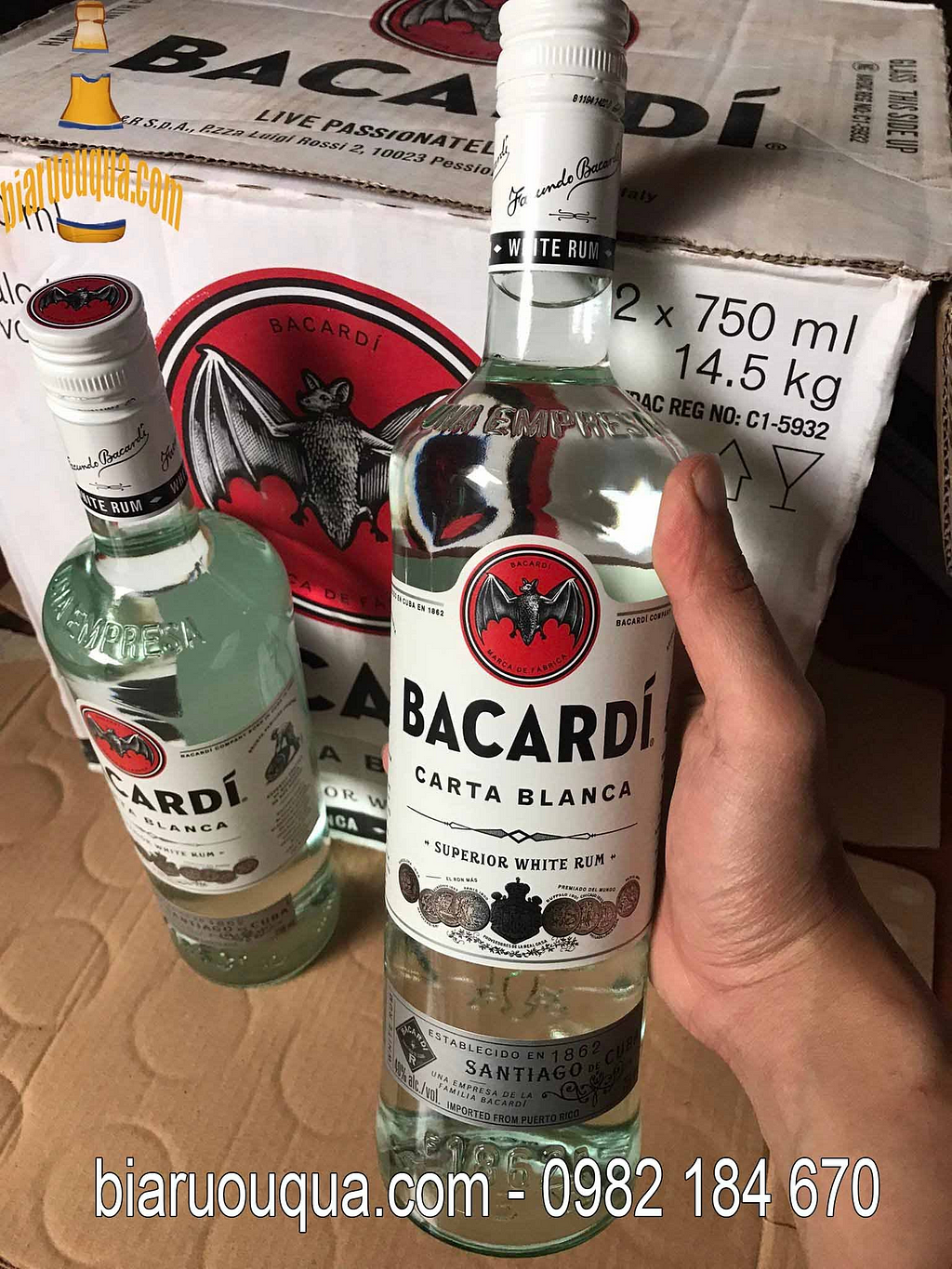
Let’s imagine a user is searching for the image shown on the right. Meanwhile, the image on the left represents our database’s entry. The two images differ, perhaps because the one on the right is from a recent bottle redesign or represents a special edition. Consequently, it doesn’t match the design stored in our database.
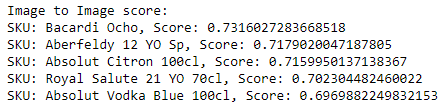
When we apply only the Image Similarity technique to the image on the right, the results are as follows:
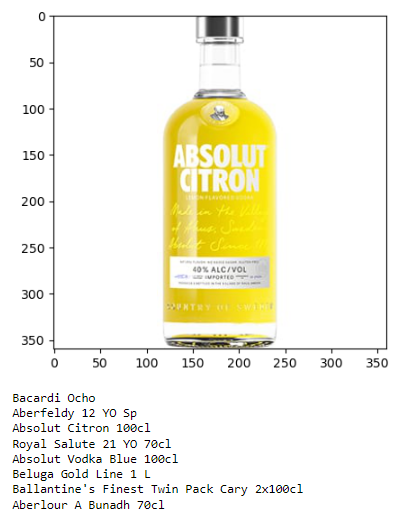
Interestingly, the most relevant result displays a completely different brand. This discrepancy might arise because the shape and color of the bottle on the right bear a closer resemblance to Bacardi Ocho rather than Absolut Citron. Furthermore, observing the remaining results, one would logically expect all the Absolut bottles to rank higher before showcasing other brands. However, that isn’t the case here.
To rectify this, we can enhance our search by extracting text features from the bottle and comparing them with the labels of all the bottles in our database. When employing the search logic I’ve developed (which I’ll explain shortly), the results are significantly improved:
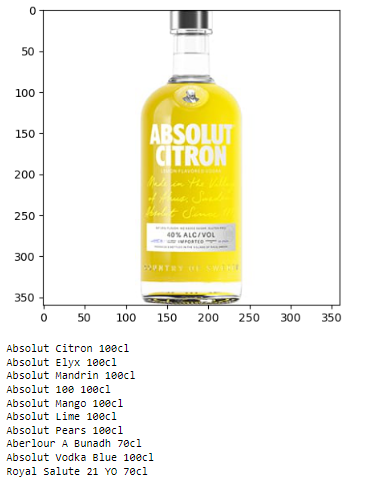
As evident, the search outcomes are now much more relevant, with other pertinent SKUs making their appearance.
Implementation:
We will be using Python 3.10 to implement the search. We start by first installing all of the following dependencies. We will explore the usage of each one shortly.
!pip install numpy==1.24.4
!pip install pandas==2.0.3
!pip install Pillow==10.1.0
!pip install Requests==2.31.0
!pip install streamlit==1.27.2
!pip install torch
!pip install transformers
Let’s also get all the imports and loading the model out of the way:
import torch
from PIL import Image
from transformers import AutoProcessor, CLIPModel
import torch.nn as nn
import requests
from io import BytesIO
import os
import numpy as np
import matplotlib.pyplot as plt
import pickle
device = torch.device('cuda' if torch.cuda.is_available() else "cpu")
processor = AutoProcessor.from_pretrained("openai/clip-vit-base-patch32")
model = CLIPModel.from_pretrained("openai/clip-vit-base-patch32").to(device)
Here we use the transformers library to import the base model of CLIP. We are using the base model just for demonstration purposes, but you can use larger models for better accuracy but just beware that larger models take more system requirements and cause more latency for giving results. You could also use the sentence-transformers library to use CLIP in your program.
As mentioned earlier, the logic is split into two parts:
Image Similarity
First, let's write a couple of helper functions.
def load_image(image_path):
    if image_path.startswith("http://") or image_path.startswith("https://"):
        return Image.open(requests.get(image_path, stream=True).raw)
    else:
        return Image.open(image_path)
def cosine_similarity(vec1, vec2):
# Compute the dot product of vec1 and vec2
    dot_product = np.dot(vec1, vec2)

    # Compute the L2 norm of vec1 and vec2
    norm_vec1 = np.linalg.norm(vec1)
    norm_vec2 = np.linalg.norm(vec2)

    # Compute the cosine similarity
    similarity = dot_product / (norm_vec1 * norm_vec2)

    return similarity
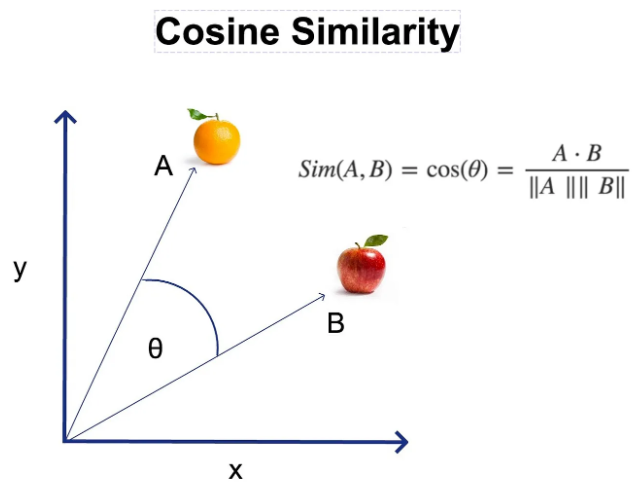
The load_image() function takes a URL, whether it be a local or an online URL, and converts it into a PIL Image object that we can manipulate in Python. The cosine_similarity() function is used to compute the similarity between two NumPy vectors. If you want to learn more about Cosine Similarity, follow the link below the image to an insightful article by AITechTrend, where they explain it in greater detail.
images = []
img_skus=[]
for root, dirs, files in os.walk(r"/Liquor_images"):
    for file in files:
        if file.endswith('png'):
            images.append(root  + '/'+ file)
img_skus=images.copy()
for i in range(len(img_skus)):
    img_skus[i]=os.path.basename(img_skus[i])[:-4]
We begin by loading all the image file paths from our dataset into the images array, and their corresponding names into the img_skus array. The dataset is stored in the same directory, under a folder named Liquor_images.
def extract_features_clip(image):
    with torch.no_grad():
        inputs1 = processor(images=image, return_tensors="pt").to(device)
        image_features = model.get_image_features(**inputs1)
    return image_features
Here, we’ve written a function called extract_features_clip(). This function takes an Image object as input and returns all the image features extracted from it using CLIP.
total_image_features=[]
for image_path in images:
    img = load_image(image_path)
    clip_feature = extract_features_clip(img)
    total_image_features.append(clip_feature)
Next, we iterate over the images array, converting the images at each filepath into image vectors. These vectors are stored in the total_image_features array. This is done by passing the images through the extract_features_clip() function that we wrote earlier.
filename='images.pkl'
with open(filename,'wb') as f:
    pickle.dump(total_image_features,f)
We then store all our embeddings in a pickle file. This allows us to save them on a storage device, from where we can retrieve them later. This eliminates the need to recompute the embeddings every time we want to perform a search. This completes all the preprocessing needed for the images.
with open(filename,'rb') as f:
    features=pickle.load(f)

def image_similarity(url):
    source=url
    image = load_image(source)
    #image=url
    image_features=extract_features_clip(image)
    similarity_scores = [cosine_similarity(image_features, i[0]) for i in features]
    merged_dict=dict(zip(img_skus,similarity_scores))
    sorted_dict = dict(sorted(merged_dict.items(), key=lambda item: item[1],reverse=True))
    return sorted_dict
Finally, we arrive at the part where we compute the image similarity. We first retrieve the image embeddings we previously created from the pickle file and store them in an array. When the image_similarity() function receives a URL, it converts the URL into an Image object using load_image(). We then compute the image embeddings by passing it through extract_features_clip(). Next, we compute the cosine similarity between the query image and all the vectors in the database using the cosine_similarity() function. We create a dictionary where the keys are the names of the most similar bottles and the values are their cosine similarity scores with the input image. Finally, we return this dictionary to the user which contains the search results.
Now let’s move onto the text similarity score.
Text Similarity
product_names = [
    "Royal Salute 21 YO 70cl",
    "Aberfeldy 12 YO Sp",
    "Aberlour A Bunadh 70cl",
    "Absolut 100 100cl",
    "Absolut Citron 100cl",
    "Absolut Elyx 100cl",
    "Absolut Lime 100cl",
    "Absolut Mandrin 100cl",
    "Absolut Mango 100cl",
    "Absolut Pears 100cl",
    "Absolut Vodka Blue 100cl",
    "Absolut Vodka Grapefruit 100cl",
    "Bacardi Carta Blanca 100cl",
    "Bacardi Ocho",
    "Baileys Original 100 CL",
    "Baileys Salted Caramel 100cl",
    "Ballantine's 30 YO 70cl",
    "Beluga Celebration 100 CL",
    "Beluga Gold Line 1 L",
    "Ballantine's Finest Twin Pack Cary 2x100cl"
]

class_names=product_names
# Compute text features for class names
text_inputs = processor(text=class_names, return_tensors="pt", padding=True).to(device)
with torch.no_grad():
    text_features = model.get_text_features(**text_inputs)
We create an array called product_names that contains the names of all the images in our dataset. Ideally, these names should closely match what is written on the labels of the liquor bottles. This array will serve as the class names to which CLIP will classify images. We then pass product_names to CLIP to extract all text features and store them in an array called text_features. You can also store this array as a pickle file for later retrieval, similar to how we stored image embeddings in a pickle file.
def predict(img_url):
    image1 = load_image(img_url)
    #image1=img_url
    image_features1=extract_features_clip(image1)
    cos_sim = nn.CosineSimilarity(dim=-1)
    similarity_scores = cos_sim(image_features1, text_features)
    similarity_scores=similarity_scores.tolist()
    merged_dict=dict(zip(product_names,similarity_scores))
    sorted_dict = dict(sorted(merged_dict.items(), key=lambda item: item[1],reverse=True))
    return sorted_dict
We then write a function called predict(), which takes in an image URL and converts it into an Image object using load_image(). We extract the image features from the query image using extract_features_clip(). We then compute the cosine similarity of the image vector to all textual vectors. Normally, this isn’t possible as image vectors and text vectors occupy different embedding spaces, but CLIP’s vectors are different. The entire design philosophy of CLIP is that both images and text share the same embedding space. This allows us to compare text vectors with image vectors. Returning to the program, we compute a dictionary similar to how we did in the image_similarity() function and return it to the user.
Now that we have one function to extract textual features and another to extract image features, all we need to do is combine them and apply some sort of logic to rank them.
def image_search(url):
    text_similarity=predict(url)
    img_similarity=image_similarity(url)
    result={}
    for k,v in text_similarity.items():
        result[k]=0.5*text_similarity[k]*3+0.5*img_similarity[k]
    top_5_keys = sorted(result, key=result.get, reverse=True)[:5]
    return top_5_keys
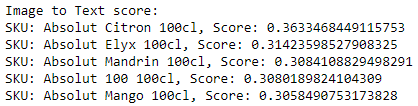
We finally define a function called image_search(), which takes an image URL as input. This URL is passed to both the predict() and image_similarity() functions, and the score dictionaries are stored as text_similarity and img_similarity, respectively. We then create a final dictionary called result, where we compute the results and store the final ranking. Finally, we retrieve the top five keys with the highest values and return them to the user. If you observe the ranking logic, you’ll notice that I’ve assigned a 75% weightage to the text similarity score and a 25% weightage to the image similarity score. This is because when comparing text to an image, you’ll find that the score is significantly lower than when comparing an image to another image. To compensate for this, I’ve arbitrarily multiplied the text similarity score by 3. You can fine-tune and adjust this value if you believe there’s a better one
Optional: Streamlit Demo
If you wish to demonstrate your search to someone, you can use the following code as a template. Just ensure that you adjust the predict() and image_similarity() functions to accept an Image object as input, rather than a URL.
import streamlit as st
st.header('Image Search App')

uploaded_file = st.file_uploader("Choose an image...", type=['png','jpg','jpeg'])
picture_width = st.sidebar.slider('Picture Width', min_value=100, max_value=500)
if uploaded_file is not None:
    image = Image.open(uploaded_file)
    st.subheader('Input', divider='rainbow')
    st.image(image, caption='Uploaded Image', width=picture_width)

        # Call your function with the uploaded image
    results = image_search(image)

    st.subheader('Results', divider='rainbow')
        # Display the results
    for product in results:
        product_image_path = os.path.join(r'Liquor_images', f'{product}.png')
        product_image = Image.open(product_image_path)
        st.image(product_image, caption=product, width=picture_width)
Demonstration
Let’s put this system to the test. I will demonstrate the search on 3 images.
Image 1
Results for Image 1
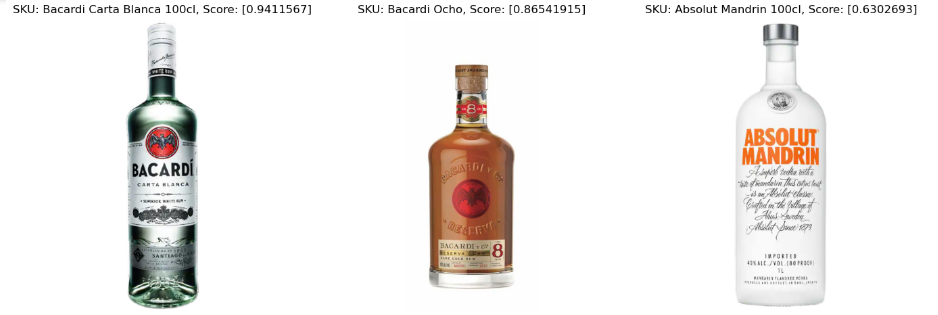
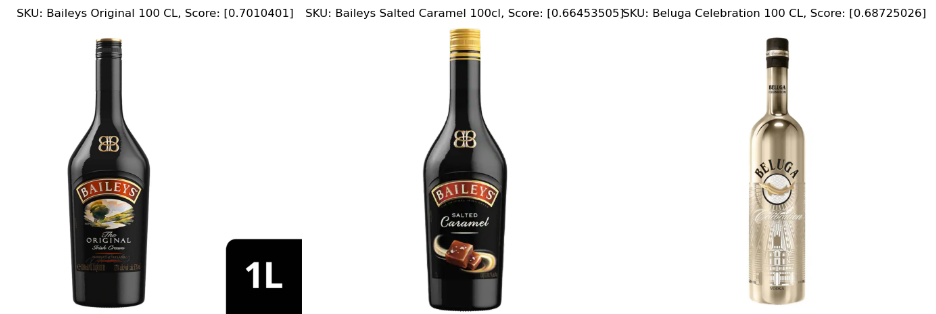
Image 2
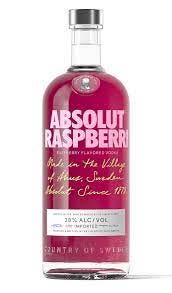
Results for Image 2
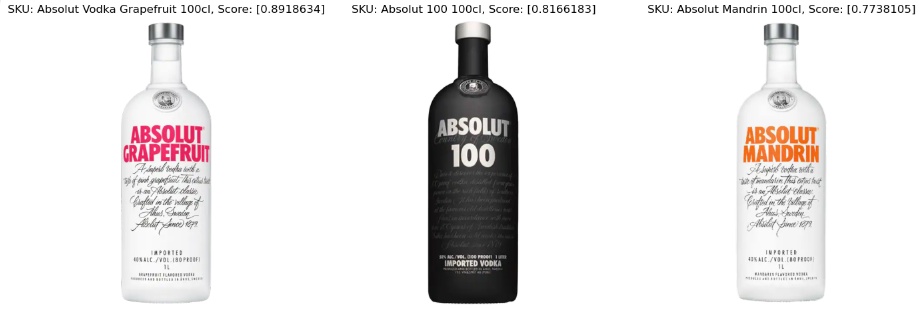
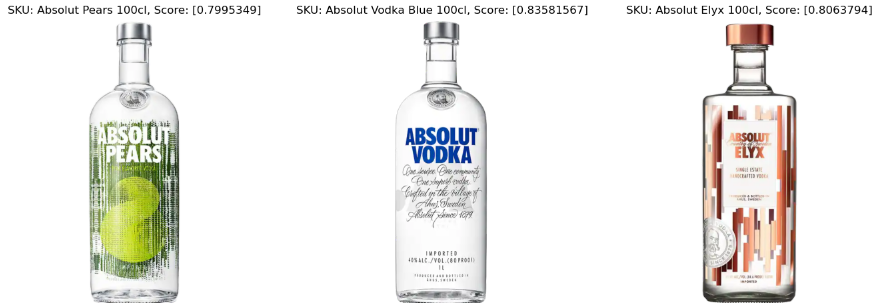
We can see that even when the image isn’t in the dataset, but the brand is, the program is able to identify the most relevant brand. Moreover, the top result is the closest color to raspberry, which is grapefruit.
Image 3
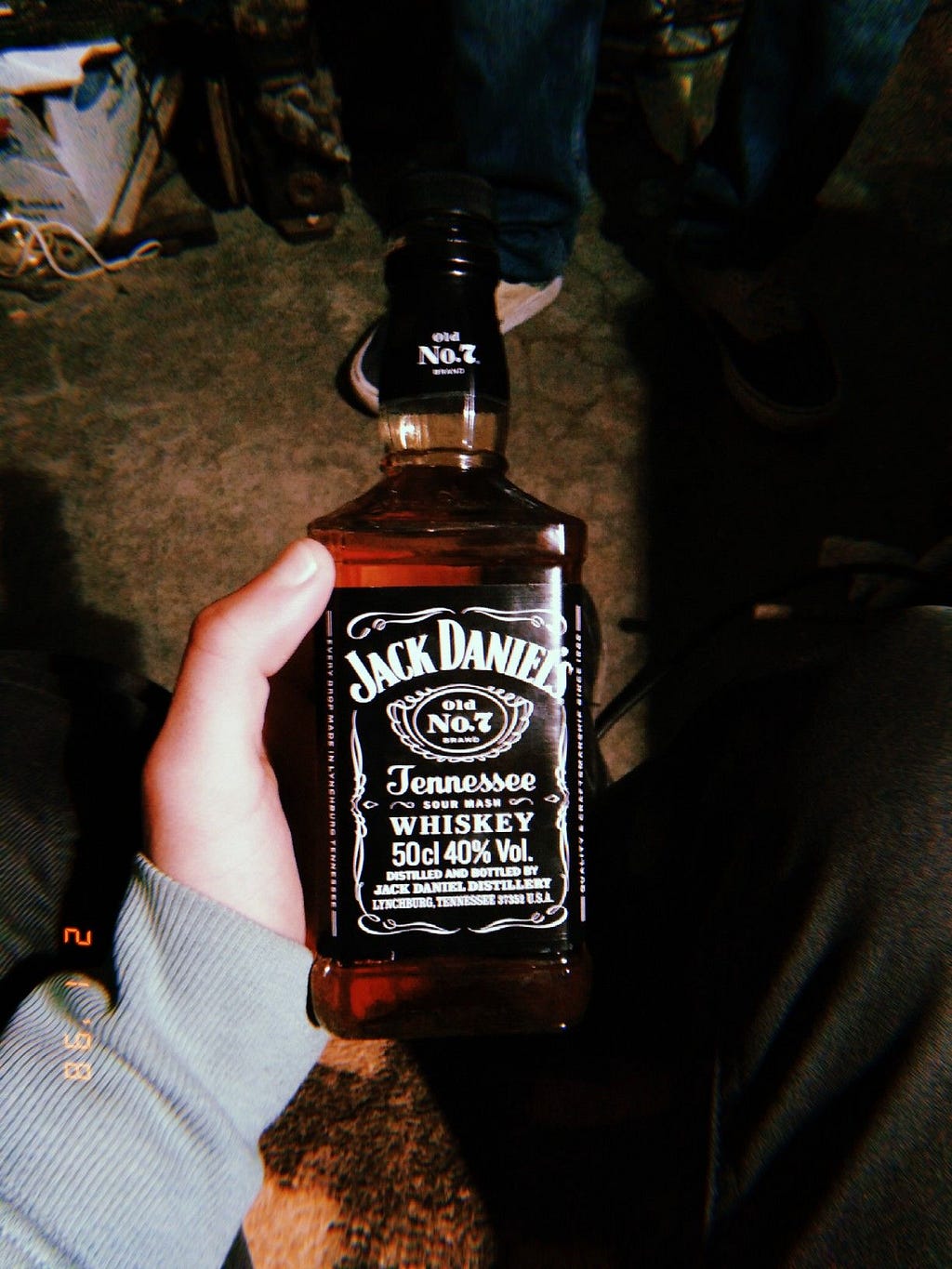
Results for Image 3
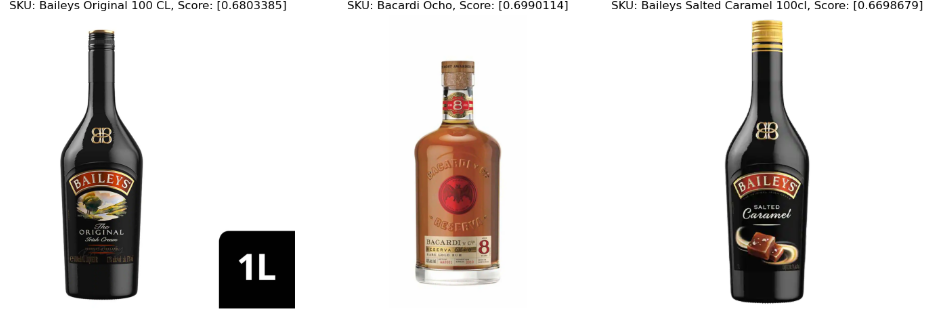
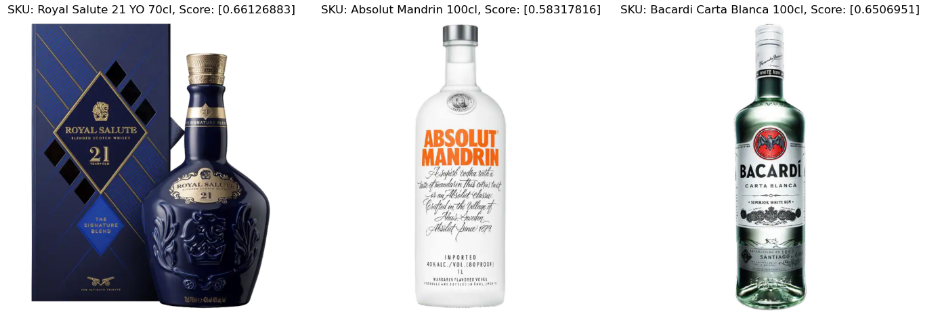
We can see that when the image is searched, if the exact SKU and brand aren’t in the dataset, it returns the image that looks closest to the provided image. Hence, the top three results are all brown-colored bottles, which resemble the provided Jack Daniel’s bottle the most. We can observe that the scores of these images are lower compared to Image 1 and Image 2, where we found exact matches either in the SKU or the brand.
Conclusion:
So that's about it folks, we have successfully enhanced the basic image similarity-based reverse image search methods by integrating the text similarity capabilities of CLIP which gives more intelligent results. If you found a flaw in my logic, feel free to message me.
I try to implement a lot of theoretical concepts in the ML space, with an emphasis on practical and intuitive applications.
Thanks for reading this article! If you have any questions, I will be happy to answer them. Feel free to message me on my LinkedIn or my email for other queries.